Spanish Subtitles or English Subtitles to Learn Spanish? What to Use at Each Level
It is the most common question among people learning Spanish with video: do I put the subtitles in Spanish or in English? Both at once? Or none at all?
The short answer: for learning, Spanish subtitles. English subtitles help you follow the plot, but they teach you very little Spanish. The long answer depends on your level and on what you want from each video, and that is what this guide is about.
🧠 Why English subtitles hold your ear back
Reading is faster and more comfortable than listening in a language you do not command yet. With the translation right there, your brain does the sensible thing: it reads the English and stops straining at the audio. You understand the video perfectly — but you understood it by reading, not by listening.
That is why so many people have watched hundreds of hours of Spanish-language series with English subtitles and still cannot follow a conversation. They spent those hours reading English with Spanish playing in the background.
Spanish subtitles work differently: you read and hear the same language at the same time. You see how what you hear is written, and you learn to recognise by ear words you already knew on paper. The research backs it up — a 2013 meta-analysis of studies on video with same-language subtitles found they improve both listening comprehension and vocabulary learning compared with watching the same video with no subtitles at all.
📊 Which subtitles to use at your level
| Your level | Subtitles | Why |
|---|---|---|
| Absolute beginner (A1) | Spanish, on beginner videos. English only with content you already know | On a normal video you would understand nothing, even reading in Spanish |
| Elementary (A2) | Spanish | You start connecting what you hear with what you read |
| Intermediate (B1) | Spanish | The level where they help most: you understand nearly everything by reading while your ear catches up |
| Upper intermediate (B2) | Spanish, only when you get lost | Listening without support is now the exercise |
| Advanced (C1) | None | Subtitles are only a distraction by this point |
The underlying rule: use the least help that still lets you follow most of the video. If you understand 80% without subtitles, turn them off. If Spanish subtitles leave you under half, the video is too hard — change the video rather than switching to English.
🔀 Spanish and English subtitles at the same time?
Dual subtitles, one line in each language, became popular through extensions like Language Reactor and Trancy. They have their place, but you need to know when.
They work for: videos that are genuinely hard for you, learning specific vocabulary (you see the word and its translation together), and content you need to understand in full, like a lecture.
They do not work for: training your ear. With both lines on screen, your eyes go straight to the English one, exactly as they would with English subtitles alone.
If you use them, take advantage of the option most of these extensions have to hide or blur the English line, and reveal it only when you get stuck. We compare them in the best free apps to learn Spanish.
⚙️ How to turn on Spanish subtitles in YouTube
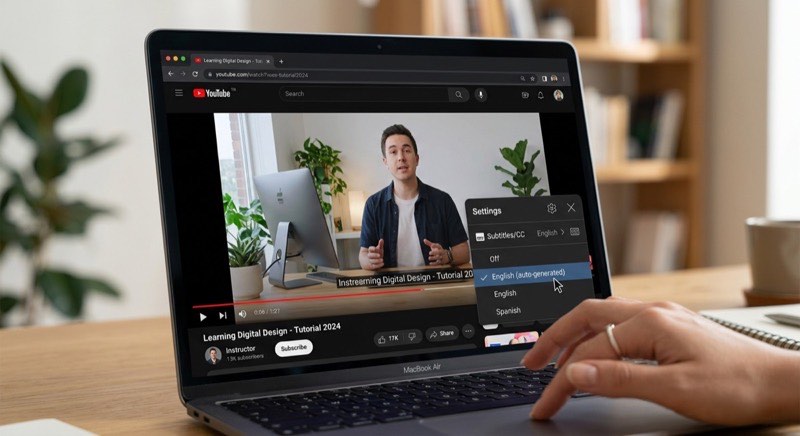
- Open the video and press CC in the player bar, or the C key.
- Click the Settings gear → Subtitles/CC and pick Spanish. If you only see Spanish (auto-generated), the video has no hand-written captions, but the automatic ones are usually decent with clear speech.
- In that same menu, Subtitles → Options lets you change the text size and background.
- To get them on every video, go to your YouTube account settings, Playback, and switch on Always show captions.
YouTube can also auto-translate captions into English (Subtitles → Auto-translate), but by now you know that is not the way to learn.
One thing worth knowing: not every video has Spanish captions. Channels made for learners almost always do. Dreaming Spanish, for instance, publishes its videos with Spanish subtitles you can switch on, which is part of why it works so well for comprehensible input. Regular Spanish-language channels often rely on auto-generated ones, and a few have nothing at all.
📺 Where to find Spanish audio with Spanish subtitles
Not all platforms treat this equally, and that matters more than people expect.
- YouTube is the most reliable free option: captions are per video, you can switch them on with one key, and there is an enormous amount of native Spanish content. Learner channels, vlogs, news, interviews, full films.
- Streaming services are hit and miss. A Spanish-language series may offer Spanish audio with English subtitles but no Spanish ones, and the subtitles often do not match the dubbing word for word. Money Heist is the classic case: people search for Spanish subtitles for season 1 precisely because what they find does not line up with what they hear.
- Subtitle websites where you download
.srtfiles are a last resort. They are usually written for a different cut of the video and drift out of sync.
For learning, the practical advice is simple: start on YouTube, where audio and captions come from the same source and actually match. For series specifically, see learn Spanish with TV shows and telenovelas.
🎧 One step past subtitles
Spanish subtitles have a subtle trap: you read slightly ahead of the audio. You think you understood a sentence, but you understood it because you read it. At B1 or B2, that can quietly stall you.
Two exercises to get past it:
- Listen first, read after. Watch a sentence with subtitles off, try to understand it, and only then turn them on to check.
- Fill in the gaps. This is what Gappier does with any YouTube video: it uses the real subtitles, but hides some of the words, and the video pauses until you type what you heard. You keep the subtitle's help everywhere else — in the gaps, all you have is your ear.
❓ Frequently asked questions about Spanish subtitles
Is it bad to watch shows with English subtitles?
Not bad, but it teaches very little Spanish. If you are doing it to relax, fine. If you are doing it to learn, switch them to Spanish.
I never use Spanish subtitles because I cannot read that fast. What do I do?
Normal at the start. Use slower videos — the learner channels in the best YouTube channels to learn Spanish — and drop the playback speed to 0.75 in YouTube. Your reading speeds up within weeks. If you still cannot keep up, the video is too hard for your level.
Do YouTube's auto-generated Spanish captions work for learning?
Yes, with clear speech. They struggle with proper nouns, strong regional accents and several people talking at once. Given the choice, hand-written captions are better.
Does Dreaming Spanish have subtitles?
Yes, its videos carry Spanish subtitles you can turn on in the player. The channel's own advice is to watch without them when you can follow along, since the whole method rests on understanding through images and context rather than text.
Is there a Chrome extension for Spanish subtitles?
Several. Language Reactor and Trancy add dual subtitles and clickable words on YouTube and some streaming sites. Gappier takes a different angle on YouTube: instead of adding a second line to read, it removes words so you have to listen.
When should I drop subtitles entirely?
When you understand roughly 80% of a video without them. Start by turning them off on the easy videos and keeping them for the hard ones.
✅ In short
- To learn, Spanish subtitles, not English ones.
- Dual subtitles only for hard videos or for vocabulary.
- Once you understand nearly everything, turn them off.
- And if you cannot follow a video even with Spanish subtitles, do not switch to English: switch videos.
To put this to work on video generally, see how to learn Spanish on YouTube, and to train the ear behind it, how to improve your Spanish listening.